Table of contents
3 min read
Building EOS Web Apps with Scatter (1/2): Account binding
Use Scatter, a Chrome-extension key manager, to bind an EOS account to a web service without ever exposing the private key in the browser.
In a previous post, we walked through sending EOS coins with eosjs — enough to confirm that EOS blockchain operations are reachable from a web environment.
But eosjs alone isn’t enough to ship a real service. The biggest open question is how to deliver a user’s private key safely. Here’s a snippet from the configuration we used last time:
let eos = Eos({
    chainId: '038f4b0fc8ff18a4f0842a8f05...',
    keyProvider: [
        "5JR9m7o......",
        "5JAj2AMS5....",
        ......
    ],
    httpEndpoint: "https://eos.greymass.com:443,
    broadcast: true,
    verbose: true,
    sign: true
});
That’s the eosjs init step — it needs the chain ID, the node endpoint, and crucially the private key for the account being used. Since the source ends up running in the user’s browser, you can technically avoid hardcoding the key by adding client-side logic that prompts the user for it. But typing a private key into a web page is itself a bad security practice.
So how do you let eosjs use a private key without ever typing it into the page? This is where Chrome extensions — and Scatter — come in.
Chrome extensions
A Chrome extension is a small program you install into the Chrome browser to add features beyond what the browser ships with.
An extension can read the page the user is currently viewing, but it runs in its own isolated JavaScript scope, separate from the page itself. Even if the user lands on a malicious site, the page can’t reach into the extension’s internals.
Scatter
Scatter is a key manager for EOS and Ethereum. Instead of typing the private key into the page, the page asks Scatter for a signature whenever one is needed — e.g., when eosjs is about to broadcast a transfer — and Scatter handles the key on its side.

Let’s actually wire eosjs + Scatter together against the EOS blockchain. First, detect whether Scatter is installed:
document.addEventListener('scatterLoaded', scatterExtension => {
    const scatter = window.scatter;
    window.scatter = null;

    // Do something...
});
When Scatter is installed, it fires a scatterLoaded event. Catch it as above, and you can branch — continue with the Scatter flow, or prompt the user to install Scatter.
Notice that we null out window.scatter and reassign the reference to a local scatter variable. The window object is reachable to every Chrome extension on the page, so leaving window.scatter populated would let other extensions reach for it — null it out as a safety measure.
In place of // Do something..., add this:
const network = {
    blockchain: 'eos',
    protocol: 'http',
    host: '52.199.125.75',
    port: '8888',
    chainId: '038f4b0fc8ff18a4f0842a8f0564611f6e96e8535901dd45e43ac8691a1c4dca',
};

const eosNetwork = {
    chainId: network.chainId,
    httpEndpoint: network.protocol + "://" + network.host + ":" + network.port,
    broadcast: true,
    verbose: true,
    sign: true
};

scatter.getIdentity({accounts:[network]}).then(identity => {

    const account = scatter.identity.accounts.find(account => account.blockchain === network.blockchain);
    const eos = this.scatter.eos(network, Eos, eosNetwork);


}, function(error) {
    console.log("login failed")
});
This configures both eosjs and Scatter using the values in the network variable. Open the page in this state and you’ll see this prompt:
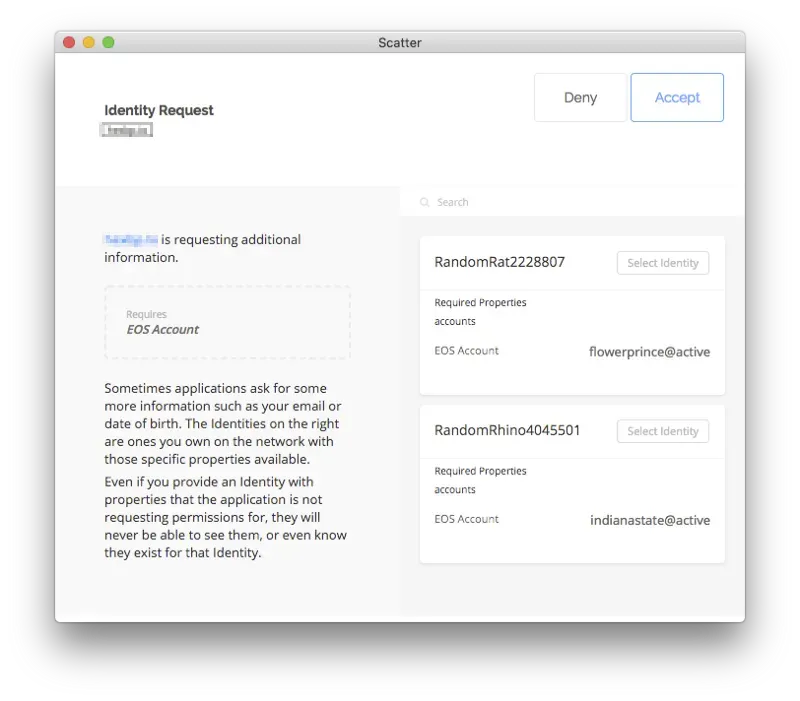
This is the account picker — Scatter shows the keys it has stored. We set blockchain: 'eos' in the network config, so only EOS-related accounts appear. Pick one, click Accept, and the account is now bound to eosjs through Scatter.
That covers what Scatter is and how to bind an EOS account to a web page through it. The next post walks through actually using that bound account — sending coins, signing custom transactions, and signing out.
In This Series
Building EOS Web Apps with Scatter
1 / 2
Keep Reading
- Sending EOS and Tokens with eosjs (2/2): Token transfer
Use the eosjs transaction method to send tokens that live in custom contracts on EOS.
Development · 2018-10-04
- Sending EOS and Tokens with eosjs (1/2): EOS coin transfer
Install and configure eosjs, then use the transfer method to send EOS coins.
Development · 2018-09-27
- Ethereum vs EOS: Who Wins?
A side-by-side look at Ethereum (gen 2) and EOS (gen 3) across usability, fees, and dApp adoption — and a guess at which platform might lead next.
Development · 2018-12-06
Discussion